
A service-area page is dedicated to a specific city, town, neighborhood, or region you genuinely serve. For a pet sitting business, that might be “Dog Walking in Carmel, Indiana” or “Cat Sitting in Redondo Beach.” These pages often get treated like a chore: copy a page, swap in a city name, add a stock photo, call it done.
That setup usually doesn’t work. Pages like that are considered thin and well…not very useful. Not that AI tools like ChatGPT and Google’s AI Overviews are deciding who gets recommended for “pet sitter near me” searches, a thin city-swap page doesn’t just underperform in traditional search. It gets skipped entirely when an AI system is trying to figure out who actually serves an area.
A useful service-area page answers three questions fast:
- Do you serve my location?
- Do you offer the service I need?
- Why should I pick you over the next name on the list?
Answer those clearly and you help two audiences. First, you need to impress the search or AI system trying to decide whether to recommend. Once they recommend you, you it’s the person reading the page you need to appeal to.
Don’t Build City Pages Just to Rank
The worst service-area pages are nearly identical twins. Same headings, same stock photo, same three testimonials, only the city name changes.
That type of page is what Google calls doorway abuse in its spam policies: pages built to rank for similar queries that funnel visitors toward one real destination without adding value of their own. As of May 2026, Google has explicitly confirmed those spam policies apply not just to traditional search results but to AI Overviews and AI Mode too. So “it might trick an AI answer even if it won’t rank normally” isn’t a loophole anymore. If a page won’t be seen in a normal search result, it won’t hold up as an AI citation either.
Before you build a page for a location, ask:
- Do we actively serve this area?
- Is there real demand to justify a dedicated page?
- Can we say something locally specific here?
- Would a visitor learn anything not already on our main service page?
- Can we keep this accurate as our coverage changes?
If the honest answer is no, include that location on another area page instead of giving it a page thinking “one more page won’t hurt.”
Start With a Direct Answer
Open with a paragraph that states what you do, where, and who you work for. Skip the scenic detail about the area, we’ll get to that later.
Here’s an example of a strong intro paragraph:
Happy Happy Pets provides in-home pet sitting and dog walking throughout Carmel, Indiana, including Home Place, the Arts & Design District, and the Village of WestClay. We care for dogs, cats, senior pets, and pets who do best staying in their own home while their people are away.
That single paragraph gives a person (and a machine reading the page) the facts: business, services, service area, and customer type, all up front. Your reader came to find out if you can walk her Labrador on Tuesday. That’s exactly what they wanted to know when they came to your page…and gave them the answer!
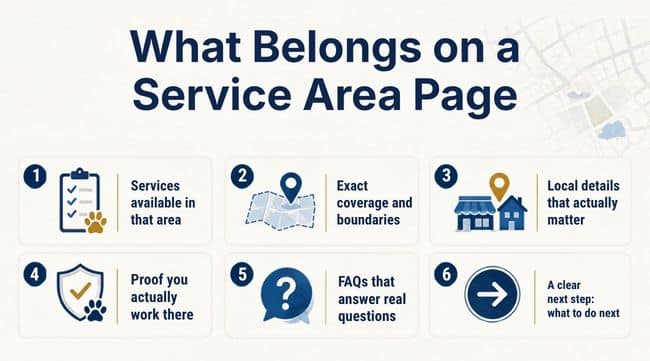
What Belongs on a Service Area Page
1. Services available in that area
List exactly what you offer there. This might be vacation pet sitting, dog walking, puppy visits, senior pet care. And, because you have separate pages for each of those services (you do have separate pages for each of those services, right?!). Since you do, be sure to link each service to its own page.
2. Exact coverage and boundaries
Describe your boundaries in plain language: neighborhoods, subdivisions, ZIP codes, major roads, or landmarks that help someone tell whether they’re actually inside your service area.
Example:
We serve most addresses within Carmel, including Home Place and the Village of WestClay. Limited service may be available near the Carmel–Westfield border. Contact us with your address if you’re unsure.
Don’t claim a whole county, town, or zip code when you realistically only cover one corner of it. Accurate boundaries build more trust than an impressive list of towns you’d rather not drive to at 7 a.m. Keep this consistent with what’s set in your Google Business Profile. Google says service areas exist specifically to help customers understand where you can show up.
3. Local details that actually matter
This is what separates a real page from a template with a city name swapped in. Depending on the business, that might be:
- Neighborhoods you regularly work in
- How you handle gated communities or apartment complexes
- Seasonal conditions that affect scheduling (winters and icy driveways, hurricanes, etc.)
- Travel fees, if there are any
- Nearby vet clinics, parks, or trails worth knowing
Only include details a customer would care about. Listing every coffee shop in town doesn’t make a page “local” — it makes it look like someone got distracted mid-draft.
4. Proof you actually work there
A testimonial from a client in that city, a short local story, an original photo, or a note about how long you’ve served the area. Encourage people to leave reviews stating what service you provided, and where.
“Great service!” could be a review for a pet sitter or a tire shop. “Sarah has watched our two cats in downtown Indianapolis every summer for three years and always leaves a handwritten note” is much more descriptive of what you do.
5. FAQs that answer real questions
Skip the generic filler. Answer what people actually ask before booking:
- Do you serve my neighborhood or ZIP code?
- Is there a travel fee?
- How far in advance should I book?
- Do you handle apartments or gated communities?
- What’s your plan for severe weather?
- Are evening or weekend visits available here?
Answer the question in the first sentence after the question. Nobody needs three paragraphs of throat-clearing before a two-sentence answer.
6. A clear next step
Tell the reader exactly what to do and what happens after they do it.
Send us your address, the service you need, and your preferred dates. We’ll confirm whether you’re within our regular coverage area and let you know current availability.

Local SEO Basics Still Matter
SEO and AEO aren’t compete with each other; they work together. AEO builds directly on solid SEO fundamentals, so it’s both, not either/or. You need to get the SEO right first.
Page title and H1. Something like Pet Sitting and Dog Walking in Carmel, IN | Happy Happy Pets for the title tag, and Pet Sitting and Dog Walking in Carmel, Indiana as the H1.
A simple URL. example.com/service-area/carmel-in/ beats a URL stuffed with every keyword variant you could think of.
Real internal links. Link to the page from your main service-area overview and relevant service pages, and link back from the page itself. If a page can’t be reached through normal site navigation, it’s not really part of your site, it’s a doorway, which goes back to the spam-policy problem above.
Genuinely unique content per page. Google’s people-first content guidance asks for content built for a real audience with a satisfying experience, not a template. If removing the city name would make two of your pages indistinguishable, that page needs more work: real differences in coverage, logistics, FAQs, and proof, not twelve creative synonyms for “reliable.”
Where AEO Actually Comes In
Here’s what Google’s own guidance actually confirms: there’s no magic file or hidden trick that skips the fundamentals. It doesn’t say all you need to do is “write decent copy.”
Google put out its first official guide on showing up in its AI-powered search results in May 2026, and the message was nice and boring: forget the gimmicks.
You don’t need a special file for AI crawlers, you don’t need to chop your content into tiny AI-friendly pieces, and you don’t need a secret AI-only version of your page. None of that is what matters. What does matter is real, specific, well-structured content.
It’s important to understand though, that guide only covers Google’s own AI features. It says nothing about ChatGPT, Perplexity, or the other AI tools people are using. And those don’t all run on the same rules. Making sure your business shows up accurately and consistently across all of them is its own job. And that’s where AEO comes in!
That’s the practical takeaway for a service-area page. Skip lines like “we proudly serve the greater metro area with premier solutions.” Name the actual neighborhoods. Explain your real boundaries. Include a detail nobody could fake like how you handle a specific gated community’s code, or that June fills up fast because of the annual Strawberry festival. That kind of lived-in specificity is what tells AI tools, Google, and the person reading the page, that you know what you’re talking about.
For AI visibility specifically, make these facts easy to find on the page:
- Business name and primary services
- City and specific areas served
- Types of customers, pets, or properties you work with
- Limitations, travel fees, or boundary details
- Answers to the questions people actually ask before booking
- A clear way to contact you
Your website, Google Business Profile, directories, and social profiles should all say the same thing about where you work. Neither customers nor AI systems should need detective work to figure out whether you cover an address.
Structured Data, Used Carefully
Structured data, also called schema markup, helps search engines and AI tools understand what a web page is actually about. Think of it as adding labels to the different pieces of your content: this part is the business name, this part is the service, this part is the area you cover. Your visitors never see it, but the machines reading the page do, and it helps them correctly identify what your information means instead of just guessing.
Google supports LocalBusiness structured data, and Schema.org offers an areaServed property specifically for describing where a service is offered. Both are worth using, but only to describe what’s actually true and visible on the page. Structured data is a supporting signal, not a shortcut that beefs up thin content. If the page doesn’t say it, the schema block claiming it is a liability, not an asset.
Common Mistakes Worth Avoiding
- Building pages for locations you don’t actually serve
- Swapping the city name and leaving everything else untouched
- Writing mostly about the city instead of the service
- Listing neighborhoods without explaining real boundaries
- Using fake local testimonials or generic stock photography as “proof”
- Hiding travel fees or coverage limits until the booking email
- Mass-producing AI-drafted pages without reviewing them. Google’s scaled-content-abuse policy targets pages like this and it applies to Google’s AI Overviews and AI Mode results, not just standard search results
- Publishing pages with no internal links pointing to them
- Leaving old pages live after you’ve dropped a service area
A Practical Outline
- Primary service and location in the H1
- A direct opening answer
- Services available in that area
- Coverage boundaries and travel details
- Local experience and what makes you different there
- A testimonial, case example, or original photo
- How booking actually works
- Location-specific FAQs
- A clear next step
- Links to related services and nearby areas
A small town might need one strong combined page. A larger service area might need more pages depending on how the area is defined by locals. The right number is set by what actually helps a customer understand and decide.
A quick clarification on #10: internal links here means linking to your own related pages — your service pages and your other nearby-city pages. It’s not a suggestion to hyperlink out to local vets, dog parks, or trails. Naming those places in your local-details section (item 3) can still be worth doing. It’s a strong signal that a page is written by someone who actually knows the area. But that’s a content choice, not a linking requirement. Save the actual outbound link for a place you have a real relationship with, like a referral partnership, so it’s not just a link you’ll forget to maintain.
The Real Test
Imagine someone lands on the page through a direct link, not a search result. Can they tell whether you serve their address? Do they know what’s available? Does the page answer their real questions and tell them what to do next?
If yes, the page will have a better chance of holding up for a human visitor, a traditional search result, and an AI-generated answer, because increasingly, those are the same test.
If not, adding the city name six more times won’t fix it.
Are your service area pages helping you get found
on Google or AI tools like ChatGPT?
Let me know and let’s talk!

Therese Kopiwoda has been designing websites since 2001, when she built the site for her own pet sitting business. She now specializes in custom web design and AEO (Answer Engine Optimization) alongside SEO, helping pet businesses and local service companies get found in Google and cited by AI tools like ChatGPT. Learn more about Therese.